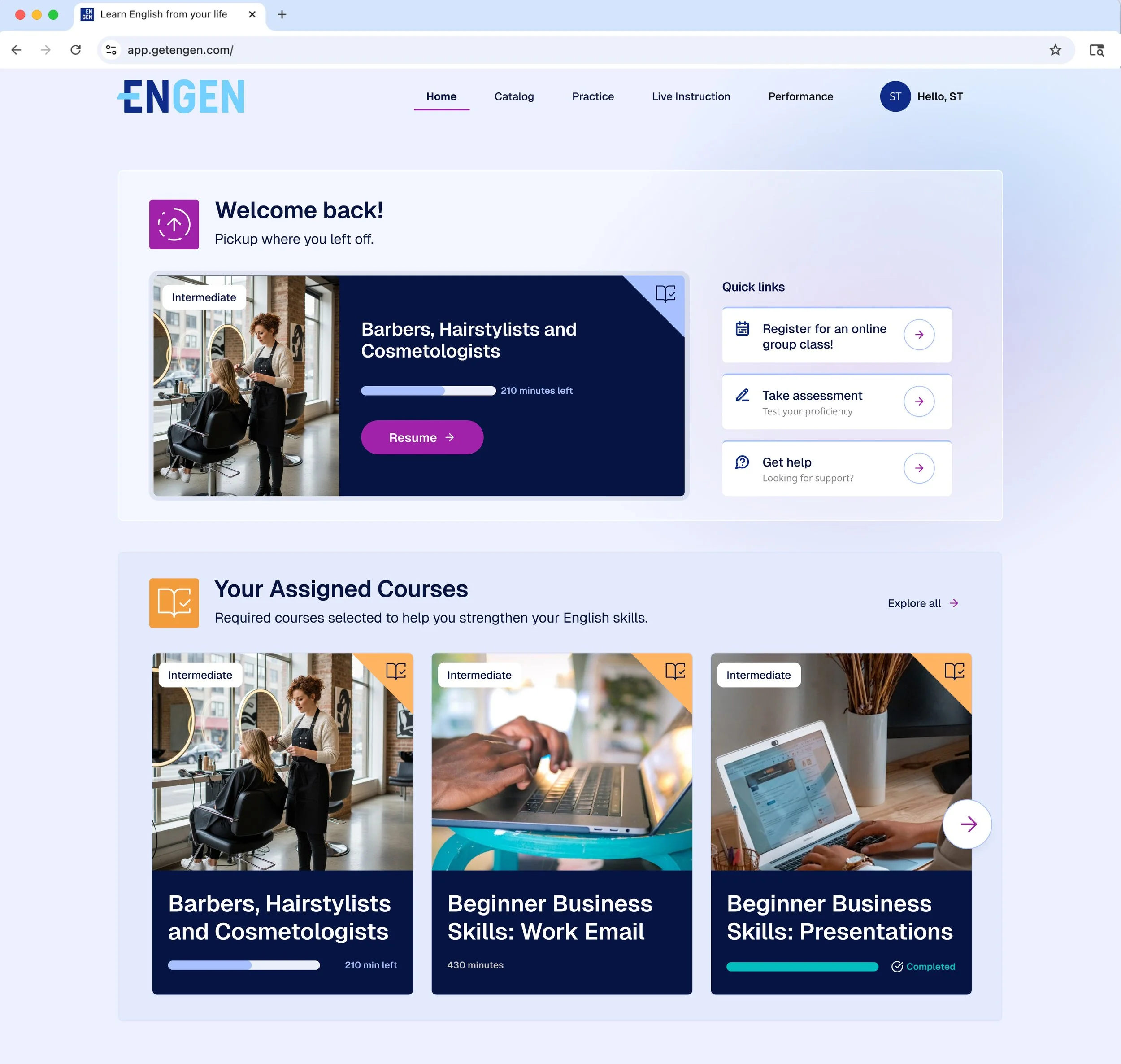
Supercharging the Future of Workforce Learning

Our updated EnGen experience will help learners progress faster and improve confidence using English at work, while helping administrators save time, streamline program management, drive engagement, and foster skill growth.

header2.jpg
 

Get Started with the New Platform: Admin Support & Resources


FREQUENTLY ASKED QUESTIONS

gradient.jpg
 

What is changing at EnGen?

EnGen is launching a refreshed, more intuitive platform.

Back to top


Will anything change for my learners?

Learners will continue using EnGen without interruption. Through the updated platform, they’ll gain more intuitive navigation, more personalized content, and new features like our writing feedback tool—all designed to help them build confidence and skills more quickly.

Back to top


Will learners lose their progress or data?

No. All learner profiles, progress, history, and reporting data will transfer seamlessly to the new EnGen platform. The only change is the link learners will use to log in; EnGen will send a multilingual email with the updated link and simple instructions.

Back to top


What support will be available during the platform transition?

EnGen’s Customer Success, Coaching, Operations, and Enrollment teams will support learners and administrators throughout the rollout with office hours and new materials. The updated platform will also include built-in guidance to help learners and administrators get oriented quickly.

Download our Quick Start Guide with step-by-step resources for administrators and admins to access the new platform.

Through December and January, we’re offering a series of demos and office hours to give you a first look at the updated EnGen platform, and an opportunity to get your questions answered. Register here for platform demos & live support.

For additional support at any time, contact your EnGen Customer Success Manager or email customersupport@getengen.com.

Back to top


What has been updated in the EnGen platform?

The updated EnGen platform is designed to power learner progress and save administrators time. Key enhancements include:

Faster, more engaging assessment
A new adaptive English proficiency assessment gets learners started quickly with real-world questions.

Stronger writing confidence
A supportive writing tool delivers actionable, step-by-step guidance that helps learners develop confidence for career success. 

A smoother learning experience
An intuitive interface and streamlined navigation make it easier for learners to stay focused and motivated from day one.

Simpler access and management
Learners and administrators now access everything through a single, streamlined link.

Access new career-aligned pathways
EnGen’s course catalog has expanded, with offerings in high-demand fields like Solar Energy and Commercial Driving. 

More support when you need it
Expanded support resources include live webinars and office hours to help your team get the most out of EnGen.

These updates were shaped by feedback from early users, learners, and administrators across the country, who shared what worked, what didn’t, and what would help them succeed faster. Our refreshed platform incorporates these insights, offering a more accessible and responsive experience for everyone.

Back to top


How can my learners & I access the new platform?

Beginning December 31, 2025, use the new URL https://learner.engen.cloud on both mobile and desktop to access your new personalized learning dashboard. Users should access the platform through the web URL rather than the mobile app.

The admin and student interfaces are now combined into a single, streamlined portal. Instructors, admins, and learners will all access the same updated user experience. 

To ensure uninterrupted access for all learners, please work with your organization’s IT or security team to allowlist (whitelist) the new URL in your organizational security, firewall, or content-filtering settings prior to launch. 

Download our Quick Start Guide with step-by-step resources for administrators and admins to access the new platform.

Back to top


Are there any new features for instructors?

A redesigned Needs Analysis feature will help EnGen better understand learner goals from the start and streamline learning inside and outside the classroom. With the updated EnGen platform, Instructors will be able to assign entire courses in addition to individual lessons, giving you more flexibility in managing instruction.

Back to top


How will learner assessments change in the new platform?

The new platform updates how EnGen measures both overall language proficiency and achievement within learning units, using research-based, learner-centered approaches.

The updated Proficiency Assessment (PA) will: 

  • Measure overall language proficiency and growth

  • Adapt to each learner’s level

  • Reflect real-world task completion

  • Align with CEFR, an international framework for language proficiency

  • Enable score mapping to previous EnGen PAs and other global scales (coming soon)

The updated Achievement Assessments will: 

  • Provide performance feedback after each unit

  • Measure progress based on overall unit performance

  • Guide learners to revisit lessons that need more practice

  • Will include course-specific achievement measures (coming soon)

Back to top


When will the updated EnGen platform be available?

To prepare for the launch of our refreshed platform, EnGen will be temporarily offline for maintenance on December 30 (midnight December 30 to midnight December 31.)

The updated EnGen platform will open for all users on December 31. Administrators and learners will receive detailed guidance and reminders ahead of the transition.

Back to top


Do I need to do anything for my learners to access the updated platform?

The transition will be automatic. EnGen will provide a new login link and step-by-step instructions to both learners and administrators. 

Download our Quick Start Guide with step-by-step resources for administrators and admins to access the new platform. 

Administrators may need to help learners locate or bookmark the updated website: learner.engen.cloud.

To ensure uninterrupted access for all learners, please work with your organization’s IT or security team to allowlist (whitelist) the new URL in your organizational security, firewall, or content-filtering settings prior to launch.

Back to top